Quick Answer
There is no universal uncensored setting for Seedance 2.5. Although platforms may display the same model name, each service can apply different prompt checks, reference rules, generation defaults, and output reviews. That is why the same prompt or image may work on one platform but fail or produce a different result on another.
To understand what happened, separate an explicit platform restriction from an input conflict, configuration difference, or model limitation. This guide explains where a request can change or stop, how T2V, I2V, and R2V behave differently, and how to test the workflow you actually need.
NSFWSeedance provides a separate, fully uncensored image and video workflow with no restrictions on prompts or creative direction. Register to receive free credits and test it without adding a payment method.
The Same Seedance 2.5 Label Can Describe Different Experiences
Seedance 2.5 is the underlying video model. A website or application offering access to it is the product you actually interact with. That product can add its own interface, upload rules, presets, moderation checks, generation limits, and delivery process around the model.
Think of the experience as a chain:
Your prompt and references → platform processing → generation route → model execution → output review → returned video
Two services can place the same model name on their model selector while handling several parts of that chain differently. One may accept text but limit reference images. Another may support references but hide some controls. A third may accept the request, create the task, and then review the generated frames before allowing the result to appear.
Seedance 2.5 is a 30-second audio-video generation model with reference control and editing capabilities. Those capabilities do not establish one universal moderation policy for every third-party product that makes the model available. Platform policies and model capabilities are separate questions.
This distinction also explains why community reports often appear to contradict each other. A statement such as Seedance 2.5 accepted my prompt is incomplete unless it also identifies the platform, date, generation mode, reference type, and failure stage. Recent discussions include creators reporting plain requests being blocked on one service while others describe different outcomes elsewhere. Those reports are useful evidence of inconsistent access, but none proves a rule that applies to every platform.
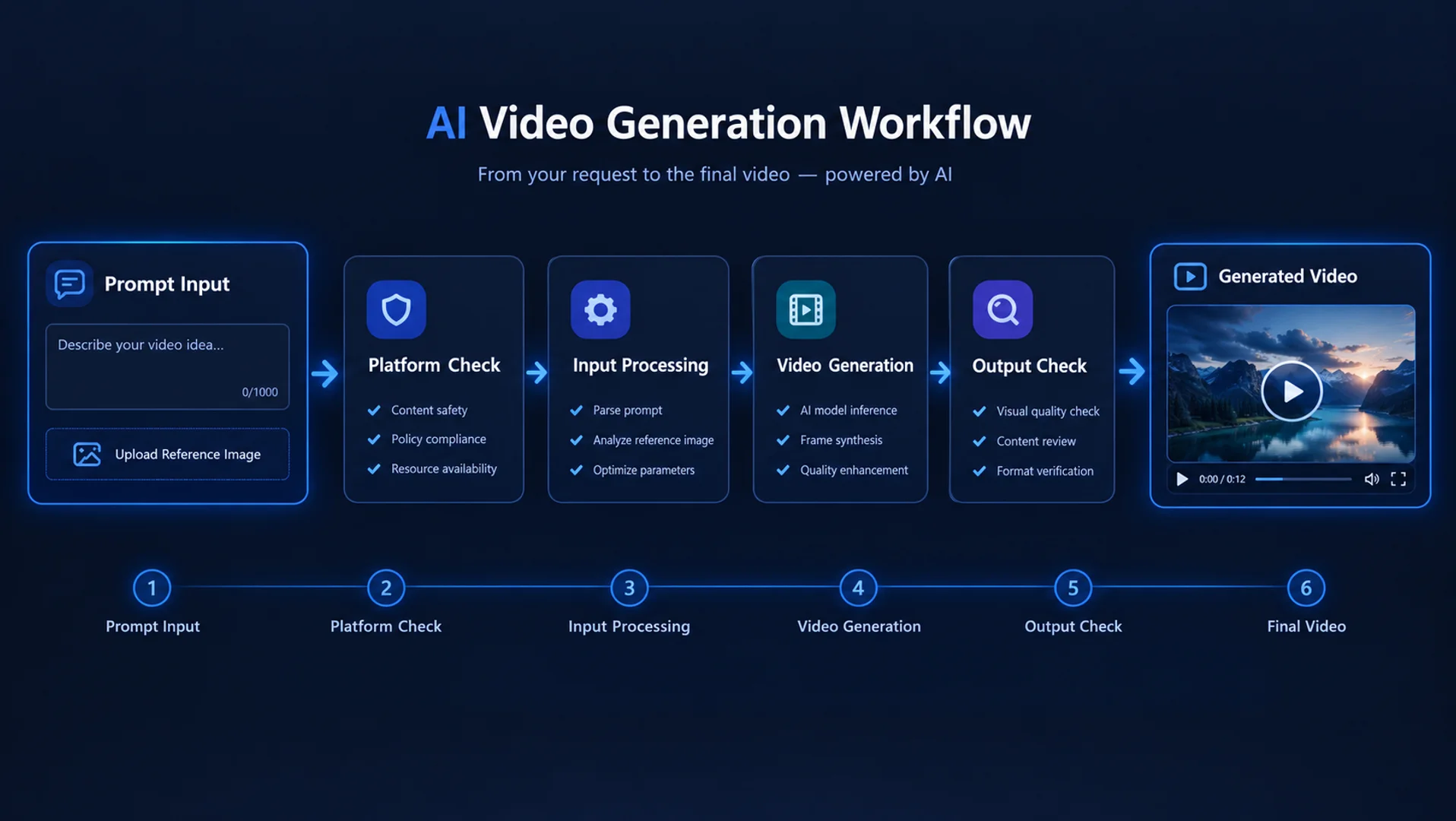
Where a Seedance 2.5 Request Can Change or Stop
The point at which a request fails tells you more than the word blocked. There are four meaningfully different outcomes.
1. The Platform Rejects the Input Before Creating a Task
If a warning appears while you type, upload an image, or press Generate, the request may not have reached the generation service at all. The platform could be checking prompt language, file type, image dimensions, visual content, account status, or regional availability.
Changing camera wording will not solve an upload rule. Rewriting the entire prompt will not solve an unsupported file. The first useful question is whether the platform accepted each input separately.
2. The Task Is Created but Returns an Error
Once a task exists, failure can come from invalid settings, incompatible controls, a rejected reference, capacity problems, or an upstream review. Generic errors are especially easy to misread. An unprocessable request does not automatically reveal whether the cause was content, format, or a conflicting parameter.
A useful community example illustrates this problem: one small Seedance 2.5 reference test produced different acceptance results with and without an attached portrait, but the returned error did not identify a moderation cause. The author correctly treated the sample as a clue rather than a universal rejection rate.
The lesson is not that one kind of image always fails. It is that removing one input at a time produces better evidence than guessing from an opaque error.
3. A Video Is Generated but Not Delivered
Some services can review outputs after generation. In that case, a task may appear to process normally before the result becomes unavailable. This is different from the model ignoring an instruction.
Look for an explicit safety, review, or delivery message before deciding what happened.
4. The Result Arrives but Does Not Follow the Request
A returned clip with weaker interaction, altered movement, changed framing, or drifting character details is not by itself proof of filtering. The model may have prioritized one reference over another, failed to resolve a physically complex action, or lost part of the prompt across a longer scene.
This distinction matters because complex-motion plausibility and stability in multi-subject interactions still have room to improve. A model limitation can resemble a conservative output even when no visible rejection has occurred.
T2V, I2V, and R2V Do Not Test the Same Thing
Creators often compare two attempts as if changing the generation mode changes only the starting material. In practice, each mode introduces a different set of inputs for the platform and model to interpret.
Text to Video Tests the Written Direction
Seedance 2.5 T2V begins with language. The platform may inspect the prompt, then the model must translate subject, setting, movement, camera behavior, pacing, and sound into a scene without a visual identity anchor.
If T2V succeeds while a reference-based attempt fails, the difference may be the uploaded material rather than the scene concept. If it generates but the character changes between attempts, that may reflect the absence of a stable visual reference rather than a restriction.
Image to Video Adds an Image Decision
Seedance 2.5 I2V asks the service to accept an image and asks the model to animate it. The image can introduce identity, wardrobe, pose, composition, visual detail, or protected material that was not present in the text-only request.
This makes the same prompt worked in T2V an incomplete comparison. The I2V request contains more information and may encounter a different upload check.
It can also fail creatively when the requested action requires the starting pose, camera angle, or body position to change too sharply from the source frame.
Reference to Video Adds Roles and Possible Conflicts
Seedance 2.5 R2V can use reference material to guide character appearance, motion, setting, framing, sound, or visual language. Seedance 2.5 is designed for extensive multimodal referencing, but more references do not automatically create more control. They create more relationships the model must reconcile.
If two images imply different facial details, proportions, lighting, or scene layouts, the model may blend them or favor one. If a motion reference conflicts with the written action, the resulting clip may preserve the movement pattern while weakening another instruction.
A platform may also support only part of the underlying reference system or label its modes differently.
When someone says a service allows uncensored Seedance 2.5, the next question should be: in T2V, I2V, or R2V? Success in one mode does not establish the behavior of the others.
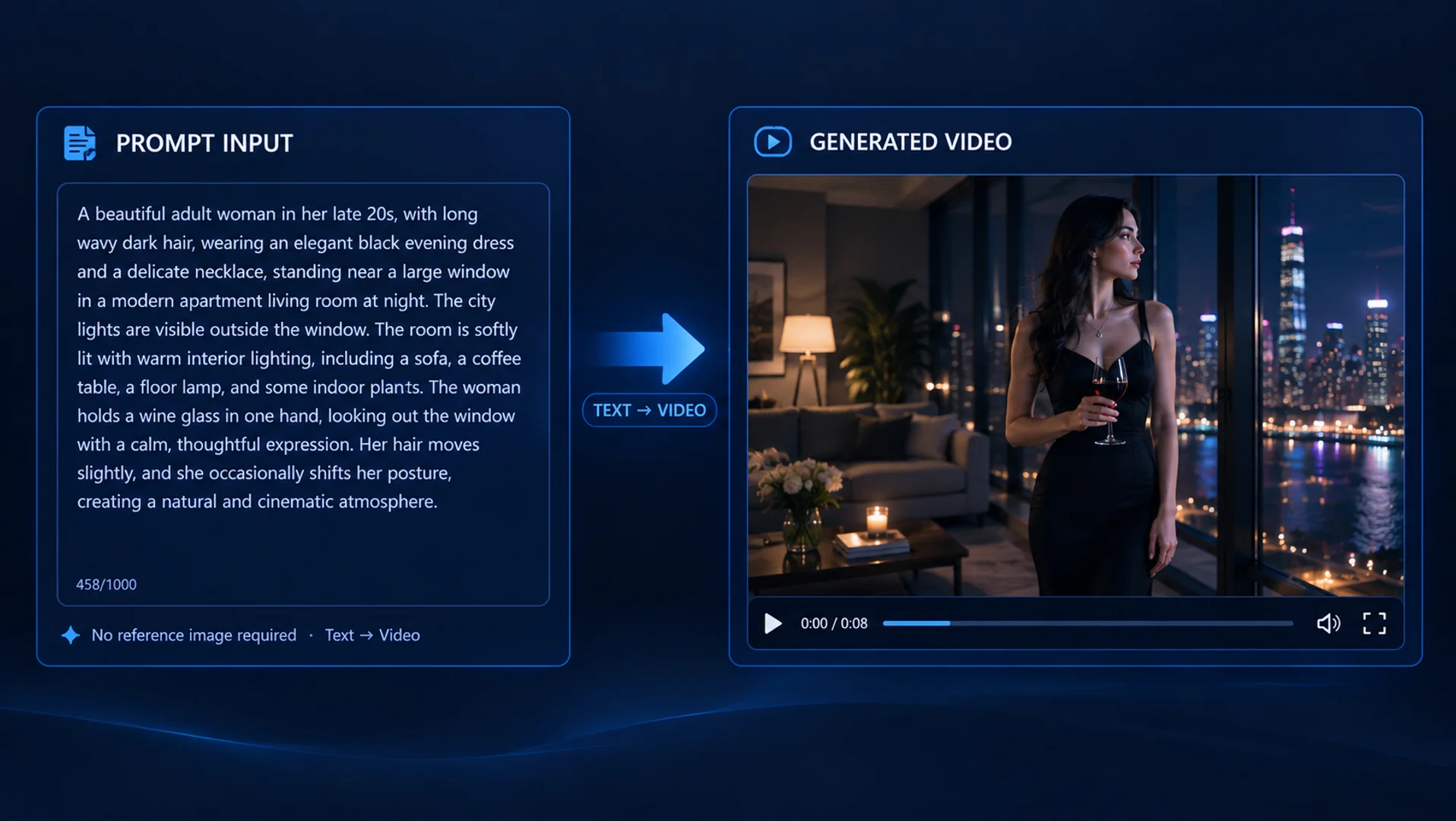 T2V
T2VText to Video
Written direction only. The model builds the visual identity from the prompt.
Prompt → scene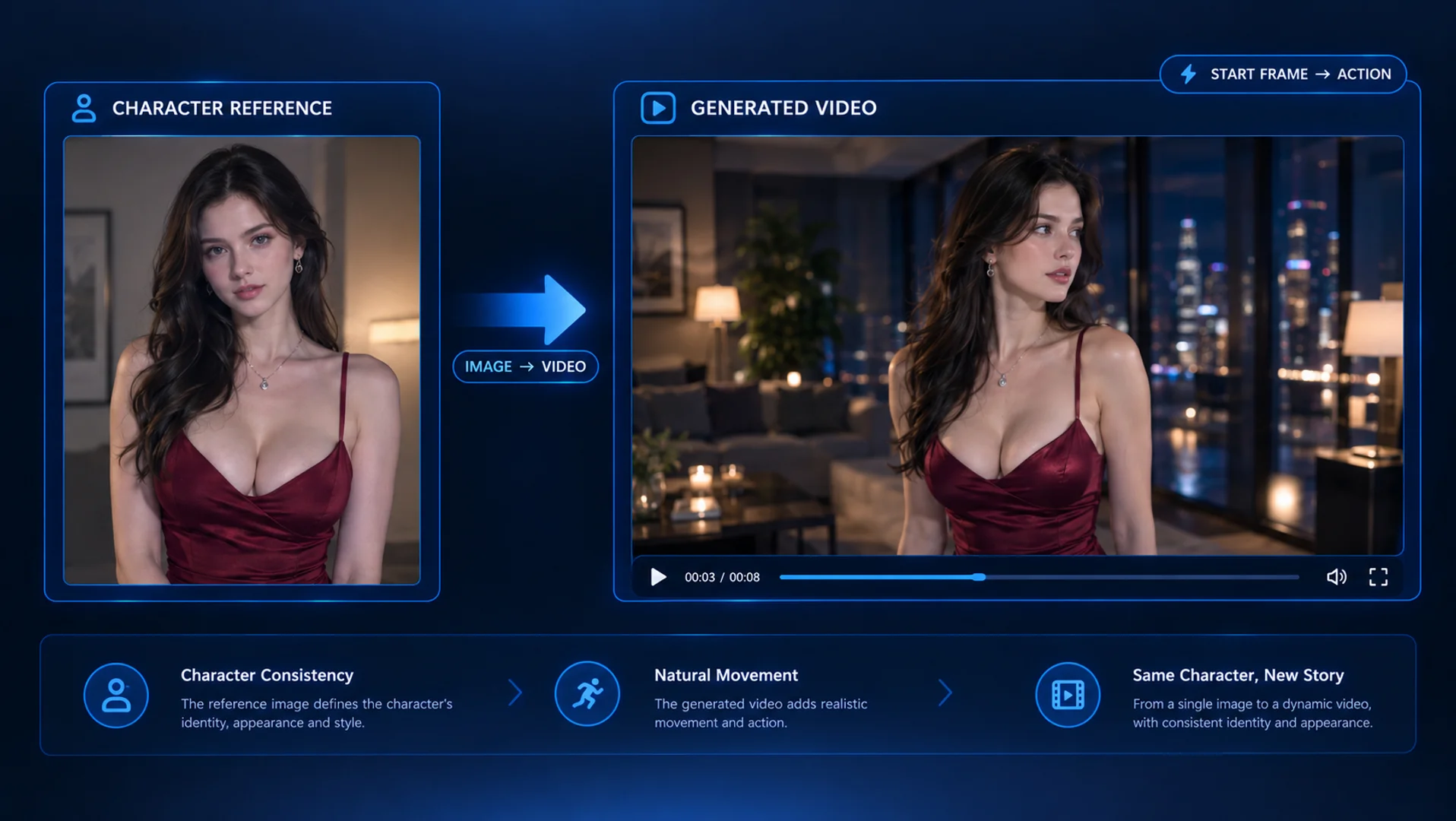 I2V
I2VImage to Video
A starting frame anchors identity, pose, composition, and the next movement.
Image → motion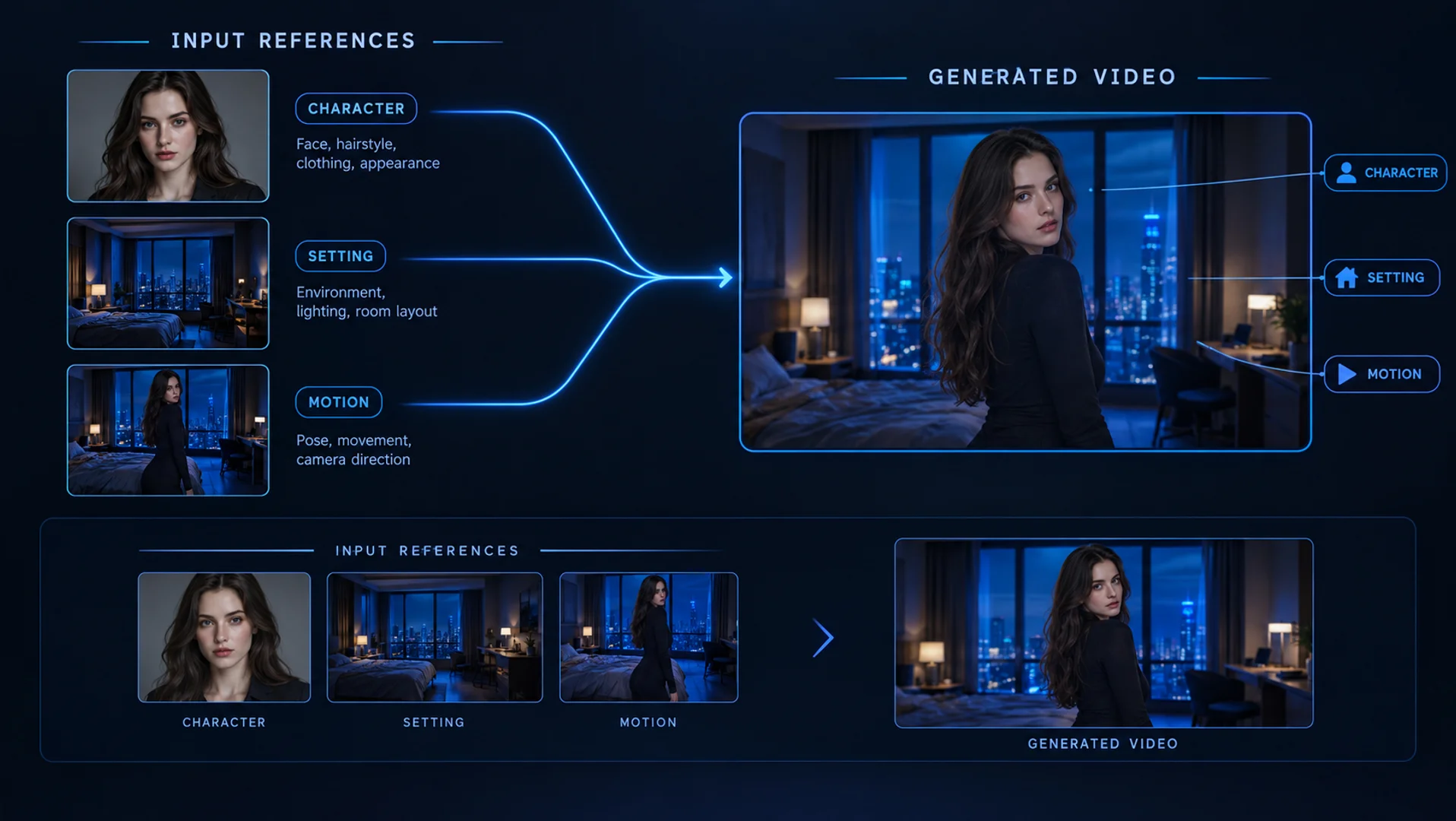 R2V
R2VReference to Video
Separate references can assign roles to character, setting, and motion.
References → sceneWhy Identical-Looking Inputs Can Produce Different Results
Even when two platforms receive the same words and files, the requests reaching the model may not be identical. Some services process assets, choose defaults, or resolve conflicts automatically.
Images May Be Resized or Compressed
Reference images that look identical on your computer can be resized to different dimensions or compressed at different levels before generation.
Fine facial details, skin texture, hands, small accessories, and background cues may survive one process better than another. The result can look like weaker model quality when the practical difference began with the input file.
Hidden Defaults Can Change the Task
Duration, aspect ratio, resolution, audio generation, camera presets, and reference priority all affect how the model handles a request. Some platforms choose these settings automatically, while others allow users to control them directly.
These differences are not theoretical. A platform may resize an unsupported image, enable audio automatically, or prioritize first- and last-frame controls when they conflict with other reference materials. As a result, two platforms can receive the same visible inputs but send materially different generation tasks to the model.
A Platform May Format or Supplement the Request
Interfaces sometimes transform user-friendly controls into structured instructions. A motion-strength control, camera menu, or style selector can add direction that is not visible in the prompt box. Default negative instructions can also steer the output away from artifacts or unwanted visual traits.
The result is that copying only the visible prompt does not necessarily reproduce the original request. For a fair comparison, match the mode, references, duration, aspect ratio, audio setting, and any visible control—not just the text.
Blocked, Weakened, or Simply Not Followed?
The most common diagnostic mistake is treating every disappointing result as a Seedance 2.5 NSFW filter. Several outcomes can look similar from the creator’s perspective but require different responses.
“Weakened” is the hardest category because there may be no explicit evidence of a filter. Suppose a prompt requests close interaction, a moving camera, two character transitions, and a location change in one short generation.
If the result keeps the setting but reduces the movement, the model may simply be resolving competing priorities.
Before attributing the output to censorship, ask whether the requested action was physically readable, whether the references agreed, and whether the scene demanded too many simultaneous changes.
This does not dismiss real platform restrictions. It prevents a creative failure from being diagnosed as the wrong technical problem.
How to Diagnose What Actually Happened
Use a controlled comparison instead of rewriting everything at once. The goal is to discover which added element changes the outcome.
Step 1: Record the Exact Test Conditions
Note the platform, date, visible model label, generation mode, duration, aspect ratio, audio setting, prompt, and reference type.
Platform behavior can change, so a result without a date has limited diagnostic value.
Step 2: Start With the Smallest Complete Request
Use one scene, one primary action, one camera direction, and one ending state. This is not about making the final video less ambitious. It creates a control result you can understand.
For example, begin with one 18+ fictional character in a stable room, one clearly described movement, and a fixed medium shot. If that request creates a task and returns a clip, add complexity deliberately rather than all at once.
Step 3: Separate Prompt Testing From Reference Testing
Run the scene as text only. Then add the principal character image without changing the words.
If the text-only version succeeds and the image version does not, the reference path deserves attention. If both generate but only the image version loses motion, the source pose or composition may be constraining the action.
For R2V, give every reference one role:
Character image: identity and recognizable visual details
Setting image: room layout, lighting, and atmosphere
Motion reference: movement rhythm or body path
Video reference: camera behavior or timing
Audio reference: voice, ambience, or sound rhythm
Avoid adding two assets that answer the same visual question differently. A larger reference set is useful only when the roles remain clear.
Step 4: Change One Variable per Attempt
If you replace the prompt, character image, duration, and generation mode together, a successful retry will not tell you what fixed the problem.
Change one variable in this order:
Remove the reference while keeping the prompt.
Replace the reference with a simpler, clearly composed image.
Shorten the scene while keeping the same central action.
Reduce simultaneous movement or camera changes.
Test another generation mode only after the earlier comparisons are recorded.
This process distinguishes a platform restriction from an input conflict and a difficult generation. It also saves credits because every retry has a diagnostic purpose.
Step 5: Compare Platforms Only After Matching the Setup
If you test elsewhere, carry over the same mode, source files, duration, framing, and audio setting. Record whether each service accepted the inputs, created a task, returned an error, or delivered a result.
One successful attempt elsewhere suggests a route or platform difference, but it does not prove that the second service has no restrictions. It proves only that this particular request succeeded under those particular conditions.
The Fastest Way to Know Is to Test the Workflow You Need
Marketing labels cannot tell you how a platform will handle your combination of prompt, reference, motion, and scene length. A small test using your real workflow is more useful than a generic claim.
Choose a representative request rather than the most extreme scene you can imagine. It should include the element that matters most to your work: an explicit prompt, a character reference, close interaction, a pose transition, or a specific camera movement.
Then check five things:
Does the platform accept the prompt without rewriting its meaning?
Does it accept the reference material required for the scene?
Does the task begin successfully?
Does the returned result preserve the central direction?
Is the character recognizable and the interaction visually coherent?
Use free credits when a service offers them, and avoid evaluating a product only through a showcase selected by the platform.
The relevant question is not whether the platform can produce one impressive clip. It is whether it can support the workflow you intend to repeat.
Create Anything You Want on NSFWSeedance
If your priority is fully uncensored NSFW creation, you can test a separate workflow on NSFWSeedance. Generate NSFW images and videos directly in the browser with no deployment, no payment method required, and free credits after registration.
NSFWSeedance supports text-to-video, image-to-video, and reference-to-video creation. Within consensual 18+ creation, you can create anything you want, with no restrictions on your prompts or creative direction.
Image and reference inputs also provide a clearer visual anchor when character consistency matters across a scene.
Generate NSFW Images and VideosChoose this route when unrestricted prompts, flexible starting inputs, and reference-led character consistency matter more than access to one specific model. Test the product for the result you need rather than choosing it solely because of a model label.
The Answer Depends on More Than the Model
So, is Seedance 2.5 uncensored? Not as a universal product-level statement. Seedance 2.5 provides long-form audio-video generation, multimodal references, and editing capabilities, but the platform around it determines which inputs are accepted, how requests are processed, and whether completed results are returned. The same model label does not guarantee the same NSFW access.
When a request fails, identify where it stopped before deciding why. An immediate warning usually points to the platform or input rules; a reference-only failure points to the reference path; a generic error requires a controlled retest; and a completed clip that misses the action may reflect prompt competition, conflicting references, or a model limitation. The real question is whether the complete workflow accepts your inputs, follows your direction, and returns a result you can use.
FAQ
01Does Seedance 2.5 Allow NSFW Video Generation?
The answer depends on where and how you access it. Platforms can apply their own prompt checks, reference restrictions, generation settings, and output review around Seedance 2.5.
Confirm the platform, generation mode, and reference type before treating one result as a general rule.
02Why Does the Same Seedance 2.5 Prompt Work on One Platform but Fail on Another?
The two services may process prompts and files differently, use different defaults, support different input combinations, or apply review at different stages.
Match the mode, duration, references, aspect ratio, and audio settings before comparing the outcomes.
03Can Seedance 2.5 I2V Be More Restricted Than T2V?
It can behave differently because I2V introduces an image that the platform must accept and the model must animate.
A text-only request succeeding does not prove that the same service will accept every image or reference workflow.
04Why Was My Seedance 2.5 Reference Image Rejected?
Possible causes include a platform upload rule, unsupported dimensions or format, regional availability, conflicting controls, reference review, or an unclear upstream error.
Test the same prompt without the image, then try one simpler reference while keeping all other settings unchanged.
05Does a “Filter Off” Option Mean There Is No Moderation Anywhere?
Not necessarily. A label may describe one prompt check or one processing route while upload rules, upstream review, and output checks still apply.
06Why Did Seedance 2.5 Generate a Video but Ignore Part of My Prompt?
The prompt may contain competing actions, the references may disagree, or the requested motion may be difficult to maintain.
Reduce simultaneous changes, assign each reference a clear role, and retest the central action before assuming the instruction was filtered.
07Can Seedance 2.5 Platform Restrictions Change Over Time?
Yes. Platforms can update policies, providers, settings, supported modes, regional access, and error handling. Record the service and test date whenever you compare current behavior with older community reports.
08Where Can I Generate NSFW Images and Videos Without Restrictions?
NSFWSeedance provides a browser-based workflow for fully uncensored, consensual 18+ image and video creation. Registration includes free credits and does not require a payment method.
You can begin with text, an image, or visual references depending on the result you want to create.